Home › Forums › Feature Requests › Temperature Conversion / Regional Settings
Tagged: FIXED
- This topic has 4 replies, 2 voices, and was last updated 3 weeks ago by
VA3MKH.
-
AuthorPosts
-
September 30, 2026 at 4:31 pm #714
VA3MKH
ParticipantI received my SDCard this week and booted up this morning to what looks like a great product! After digging into my customizations I’ve come to realize this is very much a US based product catering to US based clients. I can almost see my QTH on the map, right there just above y’all. I can live with that but the inability to set F/C for temperature in my user profile is killing me!
Your documentation claims that opening the weather widget will show the temp in C or F, not here, mine is strictly F and being born in metric Canada is extremely difficult for me to interpret.
My feature requests are two:
1: please create a C/F user profile switch so we can set our preferred Temp display and lock it in across all widgets.
2: look towards offering a map that is more than just ‘MERICA! Maybe could have regional offerings, or ability to pan/zoom?Thanks!
October 1, 2026 at 7:47 pm #739helioclock
KeymasterSubject: Re: Feature requests – C/F toggle and map coverage
Thank you for this, genuinely, this is exactly the kind of feedback that’s useful, specific and constructive.
You’re right on both counts, and I want to be straight with you rather than make excuses. The documentation is actually ahead of the software here: the weather widget is currently hardcoded to Fahrenheit only, there’s no working C/F toggle in the profile despite what the docs say, that’s a real gap, not something you’re missing in settings. Same with the map, it’s US-focused right now, no pan/zoom or regional views yet.
Both of your requests are good ones and I’m logging them as real feature requests:
1. A proper Celsius/Fahrenheit toggle in the user profile that actually applies across every widget, not just the weather detail panel.
2. Expanding the map beyond the continental US, with pan/zoom so people outside the US (and honestly, people inside it too) aren’t stuck with a fixed US-centric view.I can’t promise a timeline on either one today, but I don’t want to just say “thanks for the feedback” and let it disappear, these are real and I’ll work them into upcoming development.
Glad the rest of the product is landing well for you otherwise, and thanks for taking the time to write this up properly instead of just complaining.
73,
Anthony Watts
KA9NWM
HelioclockOctober 1, 2026 at 8:33 pm #746ParticipantThis is excellent! I appreciate you getting back to me quickly and apologize for my lack of github prowess to try to log it as some issue/feature or whatnot.
This morning prior to your message I was prodding Copilot about how difficult it would be to add this functionality myself and he seemed pretty confident that it could be done by adding a few lines of code to the weather.js file, along with edits to 4 React components. It didn’t seem like a huge undertaking but it’s also not the first time copilot has sold me a line of untrue promises!If it helps, the suggestion was to create a helper:
// VA3MKH Celsius Patch
const toC = f => (f – 32) * 5 / 9;
then to modify the returned object with:
return {
temp_c: toC(data.main.temp),
dewpoint_c: toC(data.main.dew_point),
feels_like_c: toC(data.main.feels_like),
pressure_inhg: data.main.pressure,
wind_mph: data.wind.speed,
humidity: data.main.humidity
};Along with various edits later relating to the tiles/react components.
Now I work in IT, and I was resourceful enough to sort out how to gain access to the back end via SSH but I’m no programmer. If any of this is useful, I’m happy to work with you on a solution or to just bounce ideas off of. Ultimately hoping to see this come down as an update from above, rather than a patch I need to maintain on my own little island here 🙂October 2, 2026 at 2:21 pm #750KeymasterHey VA3MKH, thanks for the kind words, and especially for the feedback – this is exactly the kind of thing that makes the product better.
First, you’re right that the map view leans US-centric by default, and that’s a fair thing to notice. It’s on my radar as something to keep improving.
Second, you caught a real documentation bug. The help file’s claim that the weather widget shows both F and C was incorrect – only the METAR panel actually did that, not the main WEATHER widget. That’s been corrected.
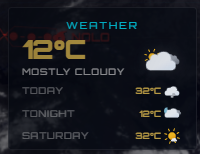
More importantly: I’ve built exactly what you asked for. There’s now a Celsius/Fahrenheit toggle in Settings, labeled “TEMPERATURE IN C.” Turn it on and it locks in C across every weather-related reading on the unit – the WEATHER panel’s current temp, the forecast strip, feels-like, dew point, and all the graph values. Off by default (Fahrenheit), so nothing changes for anyone who doesn’t touch it.
This’ll be in the next software update v3.7.40 which will be available Saturday morning. Screenshots below.


Thanks again for taking the time to write this up – please keep it coming.
73,
Anthony
KA9NWM-
This reply was modified 3 weeks, 3 days ago by
helioclock.
October 5, 2026 at 3:27 pm #787ParticipantWorking beautifully on my end! Appreciate the quick update and implemented fix. Let me know if I can offer any other project assistance. 😉
-
This reply was modified 3 weeks, 3 days ago by
-
AuthorPosts
- You must be logged in to reply to this topic.